Saturday, December 16, 2017

5. Interfacing DAC

PartB
5.Interface a DAC and generate Triangular and Square waveforms.
Theory:


Explanation:

This C code explains how Sine Wave [unipolar] is generated.
Let's find hex values for sine function which is given by  Y = A+Asin(θ)
where, A=1.25V
because we are generating unipolar sinewave let the swing be from 0V to 2.5V and hence 2.5/2= 1.25V is the mid value.
we can assign 0v with 0x00, mid value 1.25V with 0x7F and 2.5V with 0XFF.
considering 48 samples to construct one full cycle of sine wave
each sample differ with its adjacent sample by an angle of 360/48 = 7.5 degree/sample.

Example:
for θ=7.5'
Y = A + Asin(θ)
    = 1.25 + 1.25sin(7.5)
    = 1.41315V

for 2.5V    -----------------> 0xff
then 1.41315V    --------------->    ?
x=(255  *   1.41315)/2.5
  =143.57 =144=(90)h

for θ=15'
Y = A + Asin(θ)
    = 1.25 + 1.25sin(15)
    = 1.5735V
                                for 2.5V    -----------------> 0xff
then 1.5735V    --------------->    0xA1

similarly, after calculating for all 48 sample values form an array of those values.


#include <LPC17xx.H>

int count=0,sinevalue,value;
unsigned char sine_tab[49]=
{ 0x80,0x90,0xA1,0xB1,0xC0,0xCD,0xDA,0xE5,0xEE,0xF6,0xFB,0xFE,
      0xFF,0xFE,0xFB,0xF6,0xEE,0xE5,0xDA,0xCD,0xC0,0xB1,0xA1,0x90,
      0x80,0x70,0x5F,0x4F,0x40,0x33,0x26,0x1B,0x12,0x0A,0x05,0x02,
      0x00,0x02,0x05,0x0A,0x12,0x1B,0x26,0x33,0x40,0x4F,0x5F,0x70,0x80};

int main(void)
{
    LPC_PINCON->PINSEL0 &= 0xFF0000FF ;// Configure P0.0 to P0.15 as GPIO
    LPC_GPIO0->FIODIR  |= 0x00000FF0 ;
count = 0;
while(1)
{
for(count=0;count<48;count++)
{
sinevalue = sine_tab[count];        
value= 0x00000FF0 & (sinevalue << 4);
LPC_GPIO0->FIOPIN = value;
}
}
}

*****************************triangular wave****************************************

#include <LPC17xx.H>

int main ()
{
unsigned long int temp=0x00000000;
unsigned int i=0;

        LPC_PINCON->PINSEL0 &= 0xFF0000FF ; // Configure P0.4 to P0.11 as GPIO
LPC_GPIO0->FIODIR  |= 0x00000FF0 ;

    while(1)
    {
    //output 0 to FE
        for(i=0;i!=0xFF;i++)    //keep on incrementing value from 00 till FF in step of 1
        {
        temp=i;
        temp = temp << 4;
        LPC_GPIO0->FIOPIN = temp;
        }
        // output FF to 1
        for(i=0xFF; i!=0;i--) //keep on decrementing value from FF till 00 in step of 1
        {
        temp=i;
        temp = temp << 4;
        LPC_GPIO0->FIOPIN = temp;
        }
}//End of while(1)
}//End of main()

*********************************square waveform**********************************
#include <LPC17xx.H>

void delay(void);

int main ()
{
    LPC_PINCON->PINSEL0 &= 0xFF0000FF ; // Configure P0.4 to P0.11 as GPIO
    LPC_GPIO0->FIODIR  |= 0x00000FF0 ;

while(1)
    {
    LPC_GPIO0->FIOPIN  = 0x00000FF0 ;
        delay();
        LPC_GPIO0->FIOCLR  = 0x00000FF0 ;
        delay();
    }
}

void delay(void)
{
unsigned int i=0;
    for(i=0;i<=9500;i++);
}
*********************************************************************************


Download:DAC to generate triangular and square waveforms

4. Internal ADC

PartB
4.Determine Digital output for a given Analog input using Internal ADC of ARM controller.
Theory:

Explanation:


Download:Digital Output for a given Analog Input

3. Stepper motor interface

PartB
3.Interface a Stepper motor and rotate it in clockwise and anti-clockwise direction.
Theory:
Stepper motor:Stepper motors are the motors that move in discrete steps or convert electrical pulses into rotatory motion. They have multiple coils(4coils) that are organized in groups called "phases"(stators named as A,B,C and D). By energizing each phase in sequence, the motor will rotate, one step at a time.


fig: Interfacing diagram of Stepper motor with LPC1768 

fig: Wave Drive sequence


//Stepper motor

#include <LPC17xx.h>

int main( void )
{
                int i=0, n=10000,j;
                SystemInit();                        // System initialization
                SystemCoreClockUpdate(); // Clock initialization

                // Function Selection
                LPC_PINCON->PINSEL4 = 0X00000000;   // PORT 2, 12th bit as zero, P2.12 as GPIO

                // set Direction
                LPC_GPIO2->FIODIR = 0x0000000f;        // p2.0 to p2.3 as output

               
                for(j=0;j<50;j++)
                {
                                                                               
                                LPC_GPIO2->FIOSET = 0X00000008;    //set p2.3
                                for( i = 0; i < n; i++ );        // delay
                                  LPC_GPIO2->FIOCLR = 0X0000000f; //clear all the bits

                                  LPC_GPIO2->FIOSET = 0X00000004; //set p2.2
                                for( i = 0; i < n; i++ );        // delay
                                  LPC_GPIO2->FIOCLR = 0X0000000f; //clear all the bits

                                  LPC_GPIO2->FIOSET = 0X00000002; //set p2.1
                                for( i = 0; i < n; i++ );        // delay
                                  LPC_GPIO2->FIOCLR = 0X0000000f; //clear all the bits

                                  LPC_GPIO2->FIOSET = 0X00000001; //set p2.0
                                for( i = 0; i < n; i++ );        // delay
                                  LPC_GPIO2->FIOCLR = 0X0000000f; //clear all the bits
                                }                                                                                                                                      }
************************************************************************
To rotate stepper motor in opposite direction (reverse the order 8421 to 1248)
#include <LPC17xx.h>

int main( void )
{
                int i=0, n=10000,j;
                SystemInit();                        // System initialization
                SystemCoreClockUpdate(); // Clock initialization

                // Function Selection
                LPC_PINCON->PINSEL4 = 0X00000000;   // PORT 2, 12th bit as zero, P2.12 as GPIO

                // set Direction
                LPC_GPIO2->FIODIR = 0x0000000f;        // p2.0 to p2.3 as output

               
                for(j=0;j<50;j++)
                {
                                                                               
                                LPC_GPIO2->FIOSET = 0X00000008;    //set p2.3
                                for( i = 0; i < n; i++ );        // delay
                                  LPC_GPIO2->FIOCLR = 0X0000000f; //clear all the bits

                                  LPC_GPIO2->FIOSET = 0X00000004; //set p2.2
                                for( i = 0; i < n; i++ );        // delay
                                  LPC_GPIO2->FIOCLR = 0X0000000f; //clear all the bits

                                  LPC_GPIO2->FIOSET = 0X00000002; //set p2.1
                                for( i = 0; i < n; i++ );        // delay
                                  LPC_GPIO2->FIOCLR = 0X0000000f; //clear all the bits

                                  LPC_GPIO2->FIOSET = 0X00000001; //set p2.0
                                for( i = 0; i < n; i++ );        // delay
                                  LPC_GPIO2->FIOCLR = 0X0000000f; //clear all the bits
                                }                                                                                                                                      }
*********************************************************************************
for Optimal/ Efficient coding make use of Shift operator (this requires less memory and hence high performance)

#include <LPC17xx.H>

void clock_wise(void);
void anti_clock_wise(void);
unsigned long int var1,var2;
unsigned int i=0,j=0,k=0;

int main(void)
{
SystemInit();
SystemCoreClockUpdate();

LPC_PINCON->PINSEL4 = 0x00000000; //P2.0 to P2.3 GPIO
LPC_GPIO2->FIODIR = 0x0000000F; //P2.0 to P2.3 output

while(1)
{
for(j=0;j<50;j++)            //50 times in Clock wise Rotation
clock_wise();

for(k=0;k<65000;k++);         //Delay to show  anti_clock Rotation

for(j=0;j<50;j++)           //50 times in  Anti Clock wise Rotation
anti_clock_wise();

for(k=0;k<65000;k++);         //Delay to show clock Rotation
}  //End of while(1)
}  //End of main

void clock_wise(void)
{
var1 = 0x00000001;          //For Clockwise
    for(i=0;i<=3;i++)          //for A B C D Stepping
{
   LPC_GPIO2->FIOCLR =  0X0000000F;
   LPC_GPIO2->FIOSET =  var1;
var1 = var1<<1;         //For Clockwise
        for(k=0;k<15000;k++);  //for step speed variation
    }
}

void anti_clock_wise(void)
{
var1 = 0x0000008;       //For Anticlockwise
    for(i=0;i<=3;i++)        //for A B C D Stepping
    {

    LPC_GPIO2->FIOCLR =  0X0000000F;
LPC_GPIO2->FIOSET =  var1;
var1 = var1>>1;       //For Anticlockwise
        for(k=0;k<15000;k++);  //for step speed variation
    }
}

*********************************************************************************
/*stepper motor rotation based on push button status*/

 #include <LPC17xx.h>

int main( void )
{
  unsigned int key;
  SystemInit();                                      // System initialization
  SystemCoreClockUpdate();              // Clock initialization

// Function Selection
 LPC_PINCON->PINSEL4 = 0X00000000;   // PORT 2 GPIO functionality selection

// set Direction of [P2.0],[P2.1],[P2.2],[P2.3]th pin as output by passing 1
// set Direction of 11th pin as input by passing 0
 LPC_GPIO2->FIODIR = 0x0000000F;

// reading key status continuously
while( 1 )
          {
               Key = LPC_GPIO2->FIOPIN; //reading status of Port2 and storing it in variable key
               key = key & 0x00000800 ;    //bitwise and operation, as I need to check only 11th bit value

                                   if(key == 0x00000800)   //KEY IS NOT PRESSED   if(key & 0x00008000)
                                                 {
                                                     // Do nothing     
                                                 }
                                   else                   
                                                 {                                                               
                                                   for(j=0;j<50;j++)     //50 times in Clock wise Rotation
                                                   clock_wise();
          
                                                  }                                           
                   }                          
}

void clock_wise(void)
{
 var1 = 0x00000001;          //For Clockwise
    for(i=0;i<=3;i++)          //for A B C D Stepping
 {
    LPC_GPIO2->FIOCLR =  0X0000000F;
    LPC_GPIO2->FIOSET =  var1;
 var1 = var1<<1;         //For Clockwise
        for(k=0;k<15000;k++);  //for step speed variation
    }

}
*********************************************************************************


Explanation:


Download:Control Stepper motor (Wave Drive)

2. DC motor interfacing

PartB:
2.Interface and Control a DC Motor.
Theory:
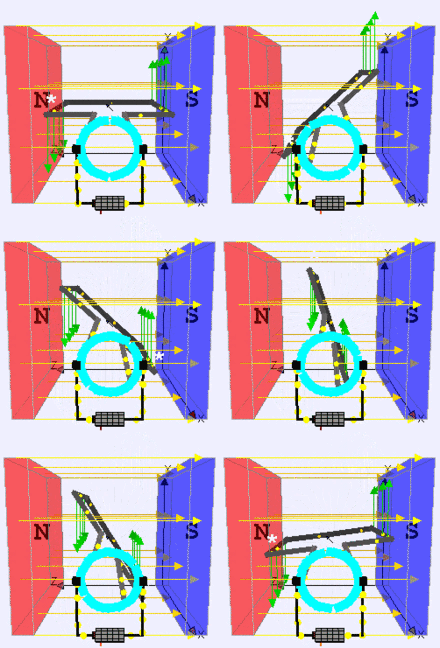
Stationary permanent magnets form the stator field. Torque is produced by the principle that any current-carrying conductor placed within an external magnetic field experiences a force, known as Lorentz force. In a motor, the magnitude of this Lorentz force (a vector represented by the green arrow), and thus the output torque,is a function for rotor angle, leading to a phenomenon known as torque ripple) Since this is a two-pole motor, the commutator consists of a split ring, so that the current reverses each half turn ( 180 degrees).

A DC motor is any of a class of rotary electrical machines that converts direct current electrical energy into mechanical energy. The most common types rely on the forces produced by magnetic fields. Nearly all types of DC motors have some internal mechanism, either electromechanical or electronic, to periodically change the direction of current flow in part of the motor.
DC motors were the first type widely used, since they could be powered from existing direct-current lighting power distribution systems. A DC motor's speed can be controlled over a wide range, using either a variable supply voltage or by changing the strength of current in its field windings. Small DC motors are used in tools, toys, and appliances.
DC motor
Block Diagram

case1:
case2:

fig: relay working
fig: phase reversal property of CE configuration
fig: darlington emitter pair used to get high current gain (beta parameter)


#include <LPC17xx.H>

void Clock_Wise(void);
void AClock_Wise(void);

unsigned long i;

int main(void)
{
SystemInit();
LPC_PINCON->PINSEL1 &= 0xFFCFFFFF; //P0.26 GPIO, P0.26 controls dir
LPC_PINCON->PINSEL3 &= 0xFFFCFFFF; //P1.24 GPIO
LPC_GPIO0->FIODIR |= 0x04000000; //P0.26 output
LPC_GPIO1->FIODIR |= 0x01000000; //P1.24 output

while(1)
{
Clock_Wise();
for(i=0;i<200000;i++);
AClock_Wise();
for(i=0;i<200000;i++);

} //end while(1)
} //end main

void Clock_Wise(void)
{
LPC_GPIO1->FIOCLR = 0x01000000; //P1.24 Kept low to off DCM
for(i=0;i<10000;i++); //delay to componsate inertia
LPC_GPIO0->FIOSET = 0x04000000; //P0.26 coil is on
LPC_GPIO1->FIOSET = 0x01000000; //P1.24 motor in on
return;  
} //end void Clock_Wise(void)

void AClock_Wise(void)
{
LPC_GPIO1->FIOCLR = 0x01000000; //P1.24 Kept low to off DCM
for(i=0;i<10000;i++); //delay to componsate inertia
LPC_GPIO0->FIOCLR = 0x04000000; //P0.26 coil is off
LPC_GPIO1->FIOSET = 0x01000000; //P1.24 Motor is on
return;
} //end void AClock_Wise(void)

*********************************************************************************
//DC motor clockwise direction rotation based on push botton status

#include<LPC17xx.h>
void Clock_Wise(void);
void AClock_Wise(void);
unsigned long i;
unsigned int key;
int n=100000;
int j;
int main(void)
{
SystemInit();
        LPC_PINCON->PINSEL1 &=0xFFCFFFFF;
        LPC_PINCON->PINSEL3 &=0xFFFFCFFF;
LPC_PINCON->PINSEL4 &=0x00000000;


LPC_GPIO0->FIODIR|=0x04000000;//GPIO functionality selection of Port 0
 LPC_GPIO1->FIODIR|=0x01000000;//GPIO functionality selection of Port 1

LPC_GPIO2->FIODIR |=0x00000000;//GPIO functionality selection of Port 2

   while(1)
  {
        key=LPC_GPIO2->FIOPIN;
key=key&0x00000800;
if(key==0x00000800)
{
   LPC_GPIO1->FIOCLR=0x01000000;
 }
else
{
   Clock_Wise();
  for(i=0;i<200000;i++);
 }
     }

}

void Clock_Wise(void)
{
LPC_GPIO1->FIOCLR=0x01000000;
for(i=0;i<10000;i++);
LPC_GPIO0->FIOSET=0x040000000;
LPC_GPIO1->FIOSET=0X01000000;

}
*********************************************************************************
control speed of DC motor using PWM


#include <lpc17xx.h>

void pwm_init(void);
void PWM1_IRQHandler(void);

unsigned long int i,j;
unsigned char flag,flag1;

int main(void)
{
 SystemInit();
 SystemCoreClockUpdate();
 pwm_init();

 while(1)
    {
       for(i=0;i<=1000;i++); // delay

    }             
}                            //end of main

void pwm_init(void)
{
 LPC_SC->PCONP |= (1<<6); //PWM1 is powered
 LPC_PINCON->PINSEL3 |= 0x00020000; //pwm1.5 is selected for the pin P1.24

 LPC_PWM1->PR  = 0x00000000;       //Count frequency : Fpclk
 LPC_PWM1->PCR = 0x00002000;        //select PWM5 single edge and PWM5 output is enabled
 LPC_PWM1->MCR = 0x00000003;       //Reset and interrupt on PWMMR0
 LPC_PWM1->MR0 = 0X00007530;      //setup match register 0[MR0] count to cycle time
 LPC_PWM1->MR5 = 0x00000064;       //setup match register 5[MR5] coount to duty cycle
 LPC_PWM1->LER = 0x000000FF;       //enable shadow copy register
 LPC_PWM1->TCR = 0x00000002;       //RESET COUNTER AND PRESCALER
 LPC_PWM1->TCR = 0x00000009;       //enable PWM and counter

 NVIC_EnableIRQ(PWM1_IRQn);
 return;
}

void PWM1_IRQHandler(void)
{
 LPC_PWM1->IR = 0xff;  //clear the interrupts

 if(flag == 0x00)  // to increase the Ton period by 64 for every iteration till MR5 is less than 6978
    {

 LPC_PWM1->MR5 += 0X00000064;
 LPC_PWM1->LER = 0x000000FF;


 if(LPC_PWM1->MR5 >= 0X00006978)
 {
 flag1 = 0xff;
 flag = 0xff;
 LPC_PWM1->LER = 0x000000FF;
 }
for(i=0;i<8000;i++);
    }

else if(flag1 == 0xff) // to increase the Toff period or to decrease Ton period by 64 for every iteration till MR5 is greater than BB8
    {

 LPC_PWM1->MR5 -= 0X00000064;
 LPC_PWM1->LER = 0x000000FF;

  if(LPC_PWM1->MR5 <= 0x00000BB8)
 {
 flag  = 0x00;
 flag1 = 0x00;
 LPC_PWM1->LER = 0X000000FF;
 }
  for(i=0;i<8000;i++);
    }
}


Explanation:


Download:control DC motor

1. Internal UART

Part B:
1.To Display “Hello World” message using Internal UART.
Theory:

LPC1768 has four inbuilt USARTs numbering 0-3. similarly, the pins are also named as RXD0-RXD3 and TXD0-TXD3 respectively. 
As the LPC1768 pins are multiplexed with multiple functionalities to reduced the pin count and to have a small form factor, first they have to be configured as UART pins.


fig: Uart0,1,,2 & 3 and its corresponding PortPins 

fig: UART Registers

LCR ( Line Control Register ):

This register is used for defining the UART frame format ie. Number of Data bits, STOP bits.


Bit 1:0 – WLS : WordLenghtSelect
These two bits are used to select the character length
00-- 5-bit character length
01-- 6-bit character length
10-- 7-bit character length
11-- 8-bit character length

Bit 2 – Stop Bit Selection:
This bit is used to select the number(1/2) of stop bits 
0-- 1 Stop bit
1-- 2 Stop Bits
Bit 3 – Parity Enable:
This bit is used to Enable or Disable the Parity generation and checking.
0-- Disable parity generation and checking.
1-- Enable parity generation and checking.
Bit 5:4 – Parity Selection:
These two bits will be used to select the type of parity.
00-- Odd parity. Number of 1s in the transmitted character and the attached parity bit will be odd.
01-- Even Parity. Number of 1s in the transmitted character and the attached parity bit will be even.
10-- Forced "1" stick parity.
11-- Forced "0" stick parity 
Bit 6 – Break Control
0-- Disable break transmission.
1-- Enable break transmission. Output pin UARTn TXD is forced to logic 0

Bit 7 – DLAB: Divisor Latch Access Bit
This bit is used to enable the access to divisor latch.
0-- Disable access to divisor latch
1-- Enable access to divisor latch 

Baudrate Calculation


LPC1768 generates the baud rate depending on the values of DLM,DLL.
Baudrate = PCLK/ (16 * ( 256 * DLM + DLL) * (1+ DivAddVal/MulVal))

Getting the PCLK value.
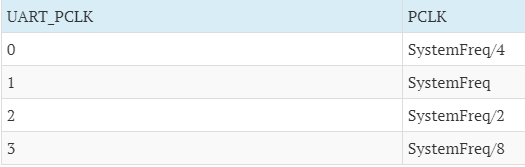
PCLKSELx registers contain the PCLK info for all the clock dependent peripherals in which Bit6,Bit7 contains the Uart Clock(ie.UART_PCLK) information.
The UART_PCLK and the actual Peripheral Clock(PCLK) is calculated as below.
(Refer data sheet for more info)
DivAddVal/MulVal == 0
Using the above parameters , DLL/DLM is calculated as below.
(256 * DLL + DLM) = PCLK / (16* Baudrate).

Baud = 
PCLK in Hertz16 x (256xDLM + DLL) x (1 + DIVADDVAL/MULVAL)
Where DIVADDVAL & MULVAL are part of “Fractional Rate Divider” or “Baud-Prescaler” which is used in Baud-Rate generation. This “Fractional Divider” is only active when DIVADDVAL > 0. This formula is pretty common for LPC ARM micro-controllers.
which can be further simplified to :
Baud = 
MULVALMULVAL + DIVADDVAL
 
X
 
PCLK in Hertz16 x (256xDLM + DLL)
with following conditions strictly applied:
  • 0 < MULVAL <= 15
  • 0 <= DIVADDVAL <= 14 - if DIVADDVAL > 0 & DLM = 0 then, DLL must be >= 2
  • DIVADDVAL < MULVAL
Where PCLK is the Peripheral Clock value in Hz , DLM and DLL are the divisor registers 

1) The Dirty and Simplest Method:

The quickest and also the dirtiest(accuracy wise) method without using any algorithm or fine-tuning is to set DLM=0 and disable the Fractional Divider. In this case MULVAL=1 and DIVADDVAL=0 which makes the Fraction Part(FP) = 1. Now we are left with only 1 unknown in the equation which is UxDLL and hence we simplify the equation and solve for UxDLL.
UxDLL = 
PCLK in Hertz16 x Desired-BaudRate

In my opinion, if possible, you must stay away from above method as it works only for particular bauds & specific PCLK value and moreover computed UxDLL might get out of range i.e. > 255 in which case you have to start increasing DLM and recompute a new value for DLL.

FCR ( FIFO Control Register )

LPC1768 has inbuilt 16byte FIFO for Receiver/Transmitter. Thus it can store 16-bytes of data received on UART without overwriting. If the data is not read before the Queue(FIFO) is filled then the new data will be lost and the OVERRUN error bit will be set.

UART0-->IER [interrupt Enable Register]
Set a bit to 0 to disable and 1 to enable the corresponding interrupt. Other bits are reserved.
  1. Bit 0 – RBR Interrupt Enable
  2. Bit 1 – THRE Interrupt Enable
  3. Bit 2 – RX Line Status Interrupt Enable

IIR – Interrupt Identification Register: This register is organized as follows:
  1. Bit 0 – Interrupt Pending  0 means at-least one interrupt is pending,                                                                                            1 means no interrupts are pending.                                                          [Note: This bit is ACTIVE LOW!]
  2. Bits [3 to 1] – Interrupt Identification :                                                                                              [011] implies Receive Line Status(RLS) ,                                                                                              [010] implies Receive Data Available(RDA) ,                                                                                  [110] implies Character Time-out Indicator(CTI) ,                                                                          [001] implies THRE Interrupt.
  3. Bits [7 to 6] – FIFO Enable.

now lets discuss only UART0.

Explanation:


#include<LPC17xx.h>

void delay(unsigned int r1);
void UART0_Init(void);
void UART0_IRQHandler(void);

unsigned long int r=0, i = 0;
unsigned char tx0_flag=0;
unsigned char *ptr, arr[] = "Hello world";

int main(void)
{
SystemInit();
SystemCoreClockUpdate();
UART0_Init();
while(1)
{
ptr = arr;
while ( *ptr != '\0'){
LPC_UART0->THR = *ptr++;
while(tx0_flag == 0x00);
tx0_flag = 0x00;
for (i=0; i<200; i++);
}
for (i=0; i<500; i++)
delay(625); //delay
}
}

void UART0_Init(void)
{
LPC_SC->PCONP |= 0x00000008; //UART0 peripheral enable
LPC_PINCON->PINSEL0 |= 0x00000050; //for selecting TX0[P0.2-->5:4] and RX0[P0.3-->7:6] of UART0
LPC_UART0->LCR = 0x00000083; //enable divisor latch, parity disable, 1 stop bit, 8bit word length line control register
LPC_UART0->DLM = 0X00;
LPC_UART0->DLL = 0x13;      //select baud rate 9600 bps
LPC_UART0->LCR = 0X00000003;
LPC_UART0->FCR = 0x07;
LPC_UART0->IER = 0X03;     //select Transmit and receive interrupt

NVIC_EnableIRQ(UART0_IRQn); //Assigning channel
}

void UART0_IRQHandler(void)
{
unsigned long Int_Stat;
Int_Stat = LPC_UART0->IIR; //reading the data from interrupt identification register
Int_Stat = Int_Stat & 0x06; //masking other than txmit int & rcve data indicator

if((Int_Stat & 0x02)== 0x02) //transmit interrupt
tx0_flag = 0xff;
}

void delay(unsigned int r1)
{
for(r=0;r<r1;r++);
}

Download:Internal UART

a) ALP

Part A
1. ALP to multiply two 16 bit binary numbers.
Theory:

Mnemonics used:
MUL, LDR,STR,BX: write explanation for these mnemonics


/*A main code calls the assembly code. A global variable by name "globvar" is declared at main in C code is loaded at asm code using the variable address.
*Basically extern keyword extends the visibility of the C variables and C functions.
*extern explicitly for C variables when we want to declare them without defining them
*to know more about extern visit:https://www.geeksforgeeks.org/understanding-extern-keyword-in-c/
*/

/*********************************c file*******************************************/
#include <LPC17xx.h>

extern  void MULTIPLY(void);      //MULTIPLY:Name of assembly routine
extern unsigned long int globvar;   //global variable to access at asm code

unsigned long int globvar,result;
#include "LCD.h"
int main(void)
{

SystemInit();
MULTIPLY(); //Function Call
result = globvar;
LCD_DISP(globvar);
while(1);

}
/*********************** ALP file or .s file ******************************************/
  AREA  MULTI , CODE , READONLY
  EXPORT MULTIPLY
  IMPORT globvar

MULTIPLY

  LDR R0,=0X706F   ; load 16 bit no. to R0 
  LDR R1,=0X7161  ; load 16 bit no. to R1
  MUL R2,R1,R0       ; multiply R1 with R0 and store result in destregister R2
LDR R3,=globvar ; load the addr of globvar into R3
  STR R2,[R3]         ;load the result present in R2 to memory location whose addr is in R3
  BX LR          ; Branch and exchange Link register content [jumps back to C code]

  END
*********************************************************************************


Download program:two 16 bit binary numbers Multiplication

2. ALP to find the sum of first 10 integer numbers.
Theory:

Mnemonics used:

/*A main code calls the assembly code. A global variable by name "globvar" is declared at main in C code is loaded at asm code using the variable address.
*Basically extern keyword extends the visibility of the C variables and C functions.
*extern explicitly for C variables when we want to declare them without defining them
*to know more about extern visit:https://www.geeksforgeeks.org/understanding-extern-keyword-in-c/
*/

/*********************************c file*******************************************/
#include <LPC17xx.h>


extern void sumten(void);          //sumten :Name of assembly routine
extern unsigned long int globvar;   //global variable to access at asm code

unsigned long int globvar,result;
#include "LCD.h"
int main(void)
{

SystemInit();
sumten();   //calling asm code
result = globvar;
LCD_DISP(globvar);
while(1);

}
/*********************** ALP file or .s file ******************************************/
THUMB
  AREA sum,CODE,READONLY
  EXPORT sumten
  IMPORT globvar
ENTRY

sumten
  MOV R1,#10 ; load 10 to register
  MOV R2,#0 ; empty R2 register to store result
loop
  ADD R2,R2,R1 ; add the content of R1 with result at R2
  SUBS R1,#0x01 ; Decreament R1 by 1
  BNE loop ; repeat till R1 goes 0

  LDR R0,=globvar         ; load the addr of var into R0
  STR R2,[R0]         ; store the result into addrs location

  BX LR ; jumps back to C code

  END

*********************************************************************************


Download program:sum of first 10 integer numbers

lab record

TECHNICAL SPECIFICATIONS of LPC1768 (15-16 of ARMCTXM3) ******************************************************************************...